
Is there a placement assessment?
Yes, Reading.com offers a placement assessment to ensure that your child is placed at an appropriate level within the program!
Note: Teacher accounts do not have a placement assessment option.
Exciting Update:
Based on feedback from our valued users, we’ve made a change! You can now retake the placement assessment if needed. We listened to your input and made this adjustment to better meet your child's learning needs. 🎉
How can I access the placement assessment?
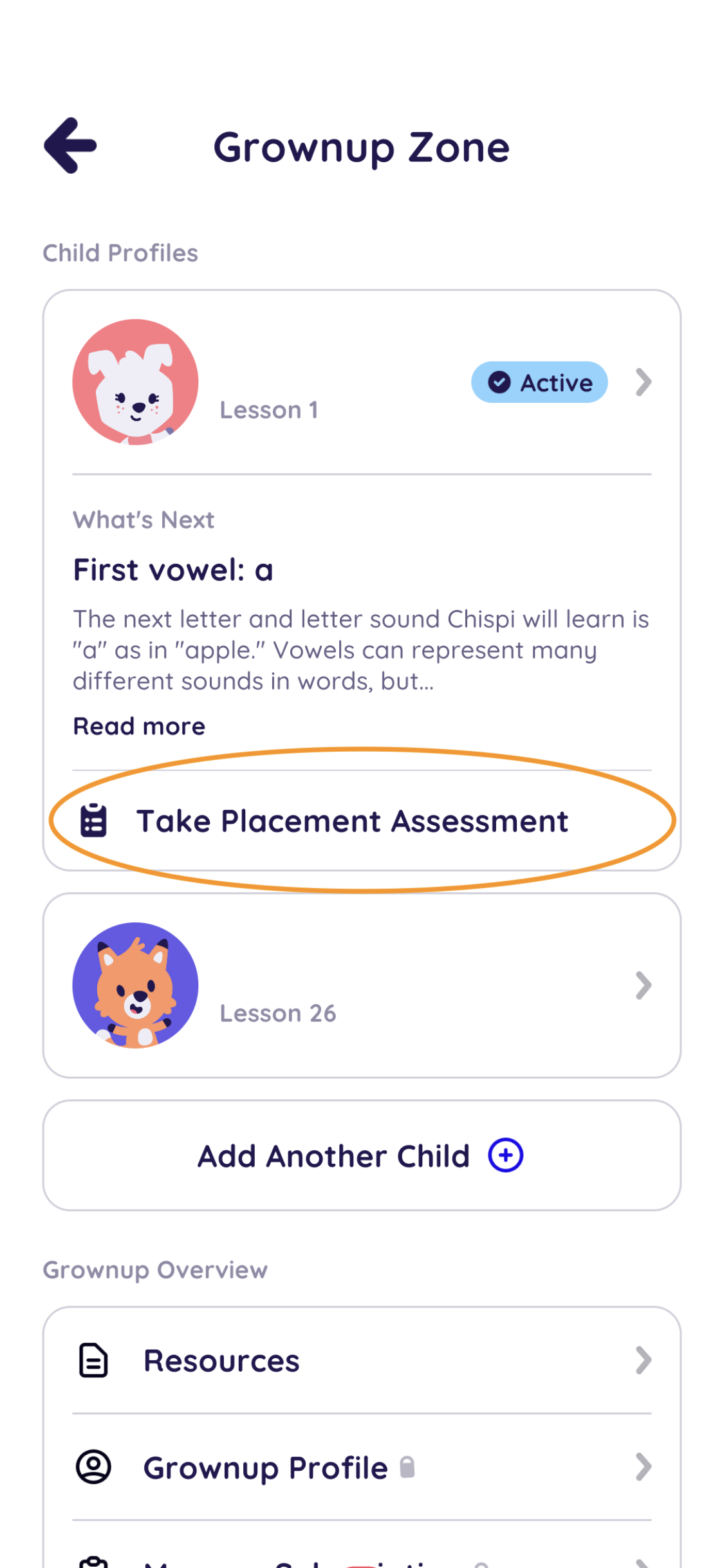
You can access the placement assessment in the grown-up section. Tap ‘Take Placement Assessment’ to begin.
What if lessons still feel too easy for my child?
If the lessons still feel too easy for your child, you can override the standard "1-lesson-per-day" progression by tapping on the next lesson stone and swiping the "Unlock Now" slider. This allows you to progress through several lessons at a time. The program's books increase in difficulty fairly quickly, so you should be able to easily find an appropriate level for your child.
Can I take the placement assessment later or after completing the initial placement?
Yes! You can now retake the placement assessment at any point in the program. Simply head to the grown-up section, tap ‘Take Placement Assessment,’ and your child can try again to ensure they’re working at the right level.
Important Note:
Placement assessments are only available for Parent Subscriptions. Teacher accounts do not include this feature but allow you to manually set lesson progress.
We’re committed to ensuring your child’s learning experience on Reading.com is tailored to their needs and abilities. If you have questions or need assistance, don’t hesitate to reach out to our support team at support@reading.com. We’re here to help make your child’s reading journey a success!